Interactive Power System Simulation in Your Browser
Traditionally, power system engineers share grid studies via PDFs, Word docs, Excel sheets, and similar files. Results are typically communicated as figures and charts. If someone reading the study wants to know how the simulation results change when something in the grid changes, like a load or a line limit, they generally have to ask the authors to rerun the simulation, or even worse, install the simulator or solver themselves.
I always found this quite unsatisfying. Why don't we have a better tool? Wouldn't it be great if you could just double click, or drag and drop, and the simulation "just works?" In pursuit of this dream, we built tellegen, a new open source web development framework for power grids. You can try the demo here. This demo just gives you an example of what you can build with tellegen.
Applications built on tellegenrun power system simulations entirely in your browser, yet all case file data and simulation results stay entirely on your machine. With tellegen, it is now possible to share a power system study as a link.
A research paper on tellegen, with Frederik Geth, Qian Zhang, Le Xie, and Skyler Liu, appeared at the first ACM Conference on Digital Transformation (DXConf). Many thanks to the organizers for the opportunity to visit my future home institution and share this exciting work!
Drag and drop your case file, click and drag sliders, and see what happens in real time.
When you open the tellegen.dev demo, you can pick between a few popular synthetic grid test cases and see the capabilities of the tool. This includes the synthetic California Test System (CATS) from the amazing team at UW-Madison. Or you can drop in your own MATPOWER, PSS/E, PowerModels, or PowerWorld file. By default, you'll see the buses colored according to their locational marginal prices (LMPs) and get a DC OPF solution. Try it out:
Click a line that's at its limit. Every bus is recolored by how its price would move if that line's rating changed.
Drag the rating slider. While you drag, tellegen shows its estimate of the cost change.
Let go, and it re-solves the OPF exactly, so you see the estimate and the real answer side by side.

That's the 6,717-bus Texas7k case, which has exactly one line at its limit. Raising its rating by 10 MW, the estimate says cost drops by 15.8 $/h, and the exact re-solve says 14.8 $/h. Close enough to steer by, and you get it while your hand is still on the slider.
Where do these estimates come from?
It's implicit differentiation, same as in my DC OPF post. The changes you're seeing previewed come from the gradients of the OPF solutions. Write the power flow equations, or the KKT conditions of OPF, as for solution and parameters . If is nonsingular, we have
A single factorization of gives you the sensitivity of prices, flows, or voltages to any parameter. Using WebAssembly (wasm), we can now do this efficiently in your browser, locally on your machine. While you drag, tellegen computes the cheap estimate
when you let go, it solves the real, reparameterized optimization problem. The same trick works for DC OPF, AC power flow, relaxations of AC OPF, and multiconductor distribution power flow. We've got it all implemented live on the tellegen.dev demo.
Your case file stays on your machine—yes, really. Drag and drop your case files with confidence.
When we were building tellegen, the key issue that we thought about for making it applicable to real utility models is that they are Critical Energy/Electric Infrastructure Information (CEII). Such grid models can't go anywhere near most web tools. But tellegen is different. In a tellegen application, your case file is parsed and solved entirely on your machine. That is, tellegen exposes full stack power system software to you compiled in WebAssembly, and none of the execution happens in the cloud. It all happens only on your own machine. Your case file and results are never uploaded, and there's no solver server for anyone to run.
How could it possibly be fast to solve OPF in my browser? This seems absurd.
When you open a tellegen application webpage, you're loading a highly optimized Rust power system simulation engine, precompiled for you to WebAssembly. Thanks to the magic of WebAssembly, your browser already knows how to execute WebAssembly, and it is really fast, like almost as fast as a native binary.
Here are the median DC OPF solve times for the demo synthetic grids, comparing both the native binary executed locally on my laptop, and the wasm code executed in my browser live at tellegen.dev:
| Case | Buses | Native (ms) | Browser (ms) |
|---|---|---|---|
| ACTIVSg200 | 200 | 4.0 | 5 |
| ACTIVSg500 | 500 | 11.7 | 17 |
| Texas7k | 6,717 | 230 | 328 |
| CATS | 8,870 | 388 | 540 |
As you can see, browser solves are close to native speeds. And it's getting closer all the time as our open source community works to optimize it. We've solved PGLib test cases up to 30,000 buses entirely in the browser. You can even solve most of these cases on your phone.
This is a small price to pay for something so user-friendly.
Does it get the right answer?
Yes, the data show it's generally comparable to state of the art power system simulators. Here's a quick comparison we collected at the time we published our paper (citation below):
Transmission OPF: 148 of 198 PGLib cases match PowerModels.jl + Ipopt within 1% (median discrepancy ); 45 more were infeasible in both. There were only five cases where we couldn't match PowerModels or had a timeout.
Distribution power flow: matches OpenDSS to machine precision on 127 of 128 ENWL test feeders and the IEEE 13-, 34-, and 123-bus feeders. There was one feeder that failed on both OpenDSS and tellegen.
Sensitivities: Our implicit gradients match finite differences in all test cases we tried.
The details are in the documentation and are being updated all the time.
AI-native support: Your agents already know how to use tellegen, and can keep you in the loop
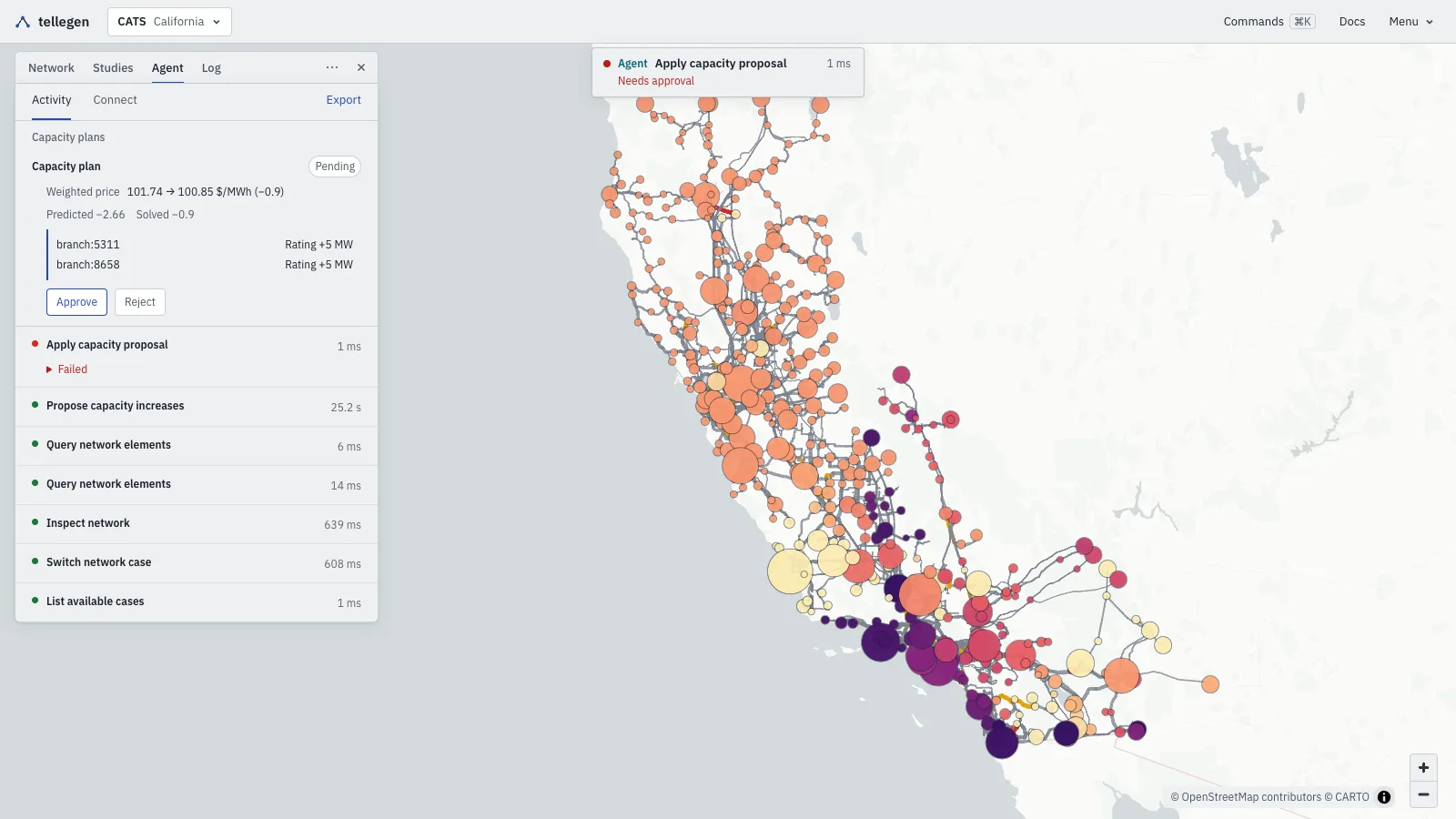
WebMCP is an emerging protocol for tools like tellegen. We have cutting edge WebMCP support, meaning that your AI agents natively know how to inspect the study and run bounded experiments, such as looking for the line upgrades that lower prices most within a budget. All you need is a WebMCP-compatible browser (like Chrome, Brave, or the ChatGPT desktop app). Your agent can propose changes, but it won't apply them on its own by default.
For example, in the CATS simulation below, the agent proposes raising two line ratings by 5 MW each. Its first try at applying the plan is refused with APPROVAL_REQUIRED, and the plan sits there as "Pending" until a person clicks Approve.
Build your own app
The tellegen framework
Keep in mind that tellegen.dev is really just a demo app for the tellegen framework, which is a few packages you can install right now:
npm install @tellegen/engine   # parsing + WebAssembly solves, agnostic to frontend framework
npm install @tellegen/svelte   # svelte frontend framework: maps, panels, local file parsing, solver interface
What else can I build with the tellegen framework?
Basically anything you can imagine. Check out our other project, MapToGrid to see an example. It generates a synthetic grid for any region on Earth and solves it in the browser. The tellegen framework takes care of parsing, solving, and sensitivities, so if you want an interactive figure for a paper or a homework problem students can poke at, you mostly just write the UI (or tell your agent to do it for you)!
If you're more old school, the tellegen engine is also available as a traditional (and differentiable) OPF solver, shipped as a Rust and Python package:
import tellegen

solution = tellegen.load("case30.m").solve()
cargo add tellegen powerioAnd just like the web framework, desktop tellegen supports most any case file you can imagine through parsing provided by PowerIO.
What's next
We're looking for an engineer who wants to test tellegen against PSS/E to run their CEII models. If you try tellegen, and especially if it breaks on your case file, open an issue or email me. I'd like to hear about it and make this better for the whole community.
We're also working on adding dynamics capabilities, like RMS and EMT. Some of these features are already available through the experimental features box in the settings page.
The name, by the way, is a nod to Tellegen's theorem.
Excited to build the next generation of power systems software, together!
Citation
@inproceedings{talkington_tellegen_2026,
      title={{Interactive Power Flow in the Browser}},
      author={Samuel Talkington and Frederik Geth and Qian Zhang and Le Xie and Skyler Liu},
      booktitle={Proceedings of the 2026 Inaugural ACM Conference on Digital Transformation},
      pages={39--47},
      year={2026},
      doi={10.1145/3847238.3849038},
      eprint={2610.01922},
      archivePrefix={arXiv},
      primaryClass={eess.SY}
}